NotebookLM, a Regular LLM, or the Two Chained Together? First Figure Out What You Actually Need
A lot of people have been using NotebookLM lately, and I often get asked: how exactly does it differ from a regular LLM like ChatGPT, Gemini, or Claude?
Some people also wonder: if Gemini can be chained to NotebookLM, doesn’t that make it the stronger, more complete version?
My take: no.
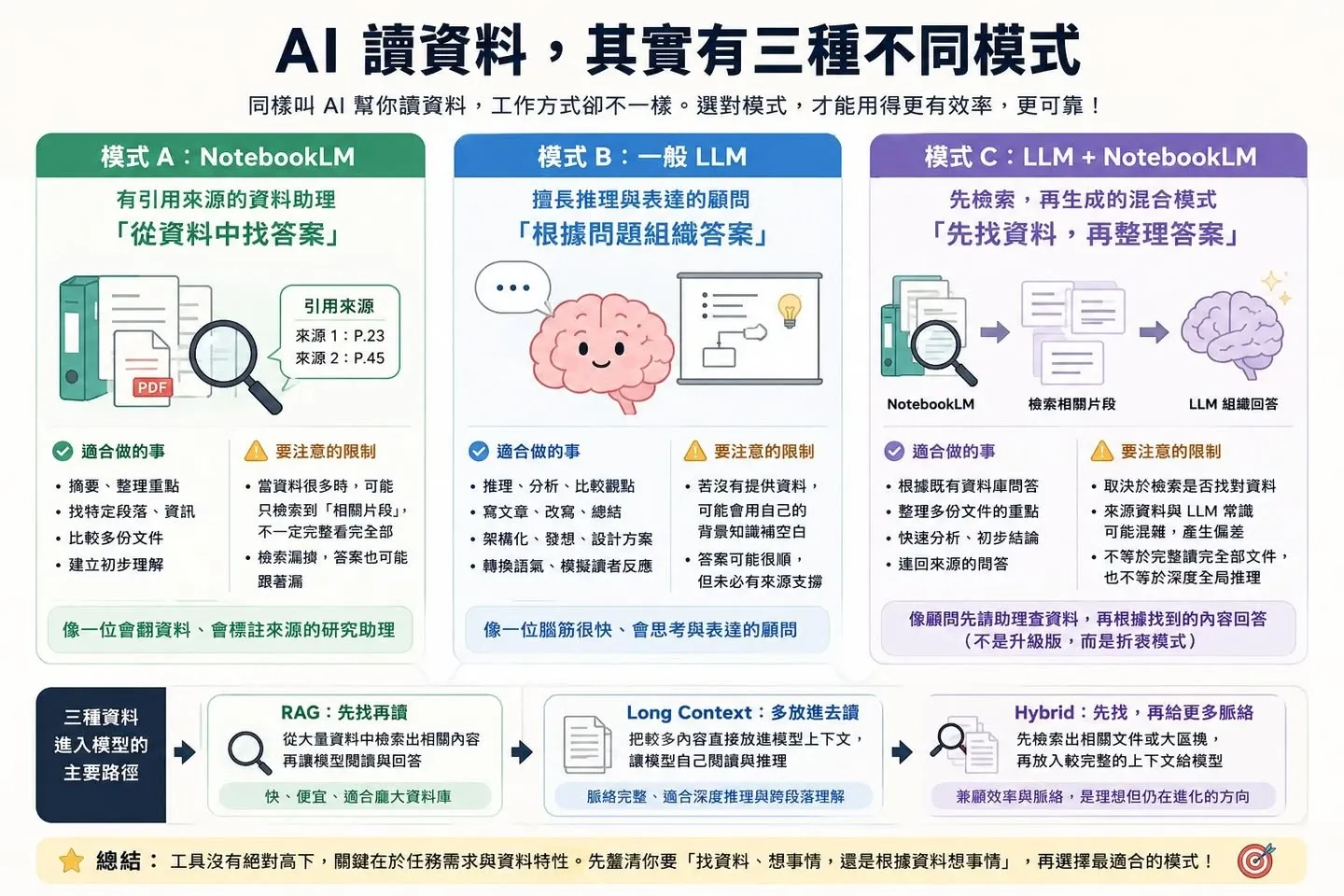
These three tool modes aren’t a matter of “higher or lower tier”; they’re a matter of different “ways of working.”
1. NotebookLM: A Research Assistant That Cites Its Sources
It’s more like a research assistant who “attaches citations.”
Strengths: You drop in documents, PDFs, and meeting materials, and it can summarize them for you, organize the key points, find the relevant passages, and mark where each answer comes from. It’s great for quickly digesting large volumes of material, building an initial understanding, and looking up what’s inside your documents.
Limitations: When there’s a lot of material, it won’t necessarily read all of it in full every time and then reason over the whole thing. It’s more that, based on your question, it finds the content the system deems relevant and generates an answer from that. So if the retrieval step misses something, the answer may miss it too.
2. A Regular LLM: A Consultant Strong at Both Thinking and Expression
It’s more like a consultant who is strong at both reasoning and articulation.
Strengths: It’s good at reasoning, rewriting, structuring, writing prose, and comparing different viewpoints. You can hand it a tangle of messy ideas and ask it to organize them into a clear argument.
Limitations: If you don’t give it enough material, it may fill in the blanks with its own background knowledge. The answer may read smoothly, but not every sentence is necessarily backed by a source.
3. An LLM Chained to NotebookLM: The Consultant Has the Assistant Look Things Up First, Then Answers
This mode is more like having the consultant first ask the research assistant to look things up, and then answer based on what was found.
Strengths: Compared with a plain LLM, it’s easier to trace back to the sources; and it’s far more convenient than re-uploading the full set of material every time. It’s well suited to doing Q&A against an existing knowledge base, plus preliminary organizing and summary comparisons.
Limitations: It’s not an “upgraded version” of the first two—it carries its own risk. If NotebookLM only turns up partial fragments at the outset, the LLM’s subsequent organizing will be built on top of those fragments; and if the LLM then mixes in its own background knowledge, you can end up with a conclusion that “sounds perfectly reasonable but isn’t actually supported by the sources.”
So How Would I Tell These Three Apart?
- NotebookLM: good for finding material.
- A regular LLM: good for thinking things through and writing things up.
- LLM + NotebookLM: good for convenient preliminary Q&A over existing material—but not the same as deep reasoning over the full body of material.
On RAG and Long Context: It’s Not About One Replacing the Other
While we’re at it, a word on two approaches that often get compared:
- RAG (which is NotebookLM’s mode of operation) is more like “search first, then read”: suited to cases where there’s a lot of material, the question is clear, and you need to quickly locate the relevant passages.
- Long Context (which is a regular LLM’s mode of operation) is more like “put it all in and read it”: suited to cases where the amount of material is manageable and you need the full context and cross-passage understanding.
The ideal working mode isn’t necessarily some particular product combination. It’s to first pin down the material you actually need, then spell out the role of that material and the boundaries of your inferences, so the model can carry out its analysis within a controlled context.
Conclusion: The Point Isn’t Which Tool You Pick
So what really matters isn’t which tool you choose, but first getting clear on this: what you need right now—is it to “find material,” to “think things through,” or to “think things through based on material”?
There’s no absolute better or worse among tools, only whether the working mode fits. And when it doesn’t fit, how to find a sensible solution within the capabilities of the tools you have—that is the key to collaborating with AI.