Adding Hα to a Galaxy Image: Enhancing HII Regions
In galaxy image processing, moderately adding Hα (Ha) data into the RGB and L channels is an advanced technique for enhancing the detail of HII regions. A galaxy’s continuum light comes mainly from its stars, so if you simply lay Ha on top, it’s easy to make the overall tone lean red. The real key lies in “controlling the proportion and the location.”
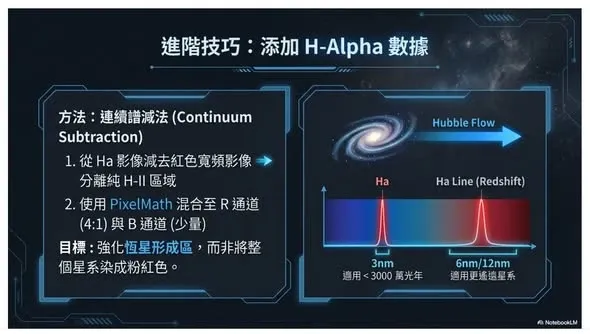
First, do continuum subtraction
The common approach is to first perform continuum subtraction: subtract the corresponding red broadband component from the Ha image, thereby extracting a purer HII-region signal. This step avoids dragging the stars’ continuum light along too, making what you subsequently blend closer to the “true emission structure.”
Blend into each channel proportionally with PixelMath
Once you’ve extracted a clean Ha signal, blend it in proportionally via PixelMath:
- R channel: blend in at a higher proportion (say 20%), to make the red emission regions stand out;
- B channel: add a tiny amount, to maintain color balance;
- L channel: blend in lightly (say 10%), to raise local contrast and structural detail, making the HII regions more prominent in brightness.
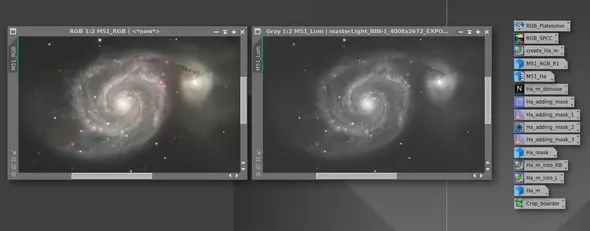
At the RGB stage, this kind of blend makes the pink emission regions in the spiral arms more three-dimensional, without going so far as to distort.
Pair it with a mask to avoid overdoing it
During blending, you can pair it with a mask as needed, to keep the galaxy core and the background from being overly affected.
The overall goal isn’t to “turn the galaxy red,” but to precisely enhance the physically real emission structure while preserving the original color. With the proportions judged well, the result will be natural, layered pink emission regions — not spiral arms dyed red across the board.