Normalizing Signal Strength Across Narrowband Channels
The most basic form of narrowband processing is to map narrowband images straight onto the RGB channels—for example, the HOO, SHO, or HSO palettes.
However, because the signal strength differs from one channel to another, mapping narrowband channels directly into RGB often produces an all-green result (for example with SHO) or an all-red one (for example with HSO). This is where you need to do “channel normalization,” raising the different narrowband signals to comparable strengths so they can be combined afterward.
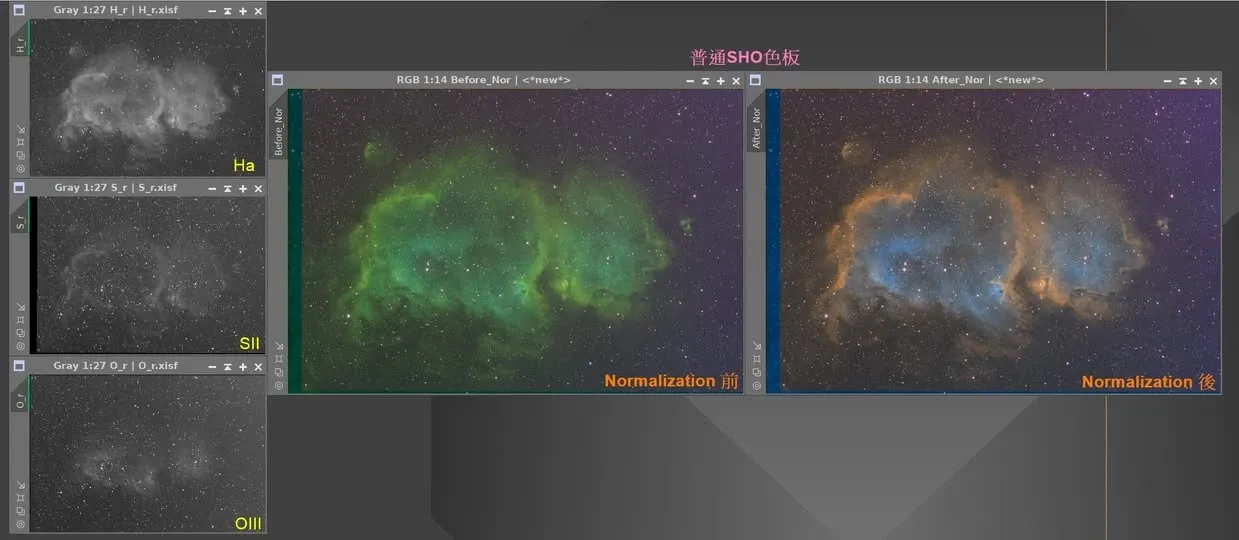
Several Common Normalization Approaches
In PixInsight, you can raise different narrowband signals to similar strengths using basic tools. The common entry-level approaches are as follows:
- Linear Fit
- PixelMath formula (for example, manually boosting a particular channel)
- Script (for example, scripts like SHO-AIP)
- Curve
One Premise You Have to Think Through First
But a word of caution: although these tools can raise the signal strength, the signal-to-noise ratio of a narrowband signal itself still has to be built up through accumulated exposure hours.
For example, the OIII or SII of certain targets is inherently weaker, and after being raised, the noise only becomes more obvious, ultimately giving a particular channel of the combined image a poorer signal-to-noise ratio that shows up directly in the picture. So normalization solves the problem of “brightness alignment,” not the problem of “insufficient signal”—and for the latter there’s no shortcut—the only answer is more exposure time.