Plate Solving and Annotating Celestial Objects
Plate solving is a very basic yet broadly useful feature in PixInsight. This article rounds up what plate solving can do, as well as how to use the coordinate information it yields to automatically annotate celestial objects on an image, and even mark comets.
What Plate Solving Can Do
In PixInsight, after plate solving with the ImageSolver script, there are at least two major uses:
- Color balance: in the linear stage, the plate-solving result can be fed to the PCC or SPCC process to perform color calibration.
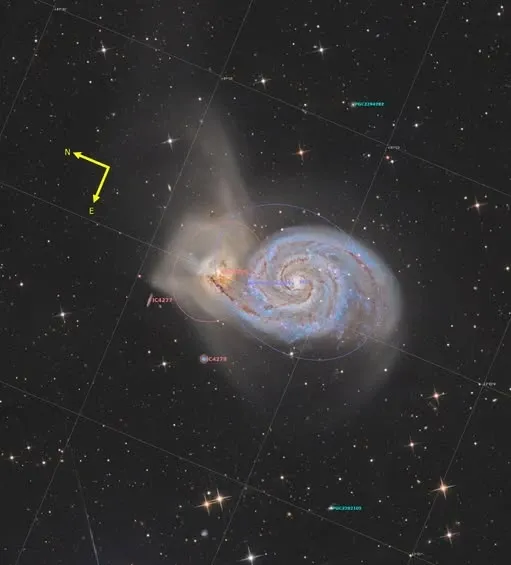
- Automatic annotation: at the finished-image stage, the coordinate information on the image can also be used to automatically annotate the image—for example, labeling the names or catalog numbers of celestial objects, as well as the frame’s rotation (orientation).
Labeling Catalog Objects (LBN, LDN, VdB, Sh2, B, etc.)
To label catalog objects such as LBN, LDN, VdB, Sharpless (Sh2), and Barnard (B) in PixInsight, the steps are as follows:
- Make sure the image has been plate-solved (if not yet, use ImageSolver first)
- Open the Image Annotation Script under Script
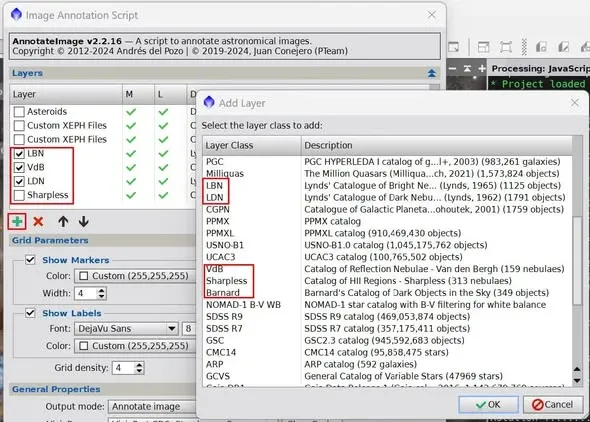
- Press the “+” on the left to add a new layer
- Find the object catalog you want (such as LBN, LDN, VdB, etc.), select it, and press OK
- On the Layer list of the Image Annotation Script, check the catalog layer you just added
Automatically Marking Comets
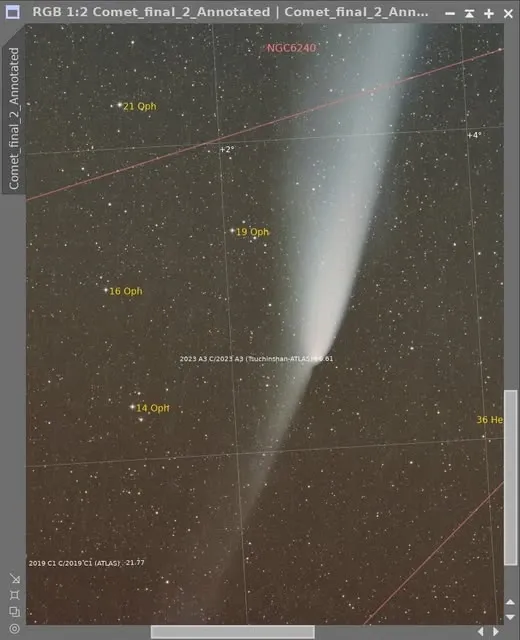
Annotating comets takes one extra step. After plate solving, just download the comet database in the PixInsight Distribution System, and you can annotate comets in PixInsight. One thing to pay special attention to: the capture time (Universal Time, UT) and the latitude and longitude must be entered correctly, because a comet’s position changes rapidly over time. Once this information is filled in correctly, the rest can be left to the script to annotate automatically.