Restoring PixInsight's Use of Filenames as Image IDs
In PixInsight, every open image is assigned its own unique ID, shown on the tab bar to the left of the image. This article explains version 1.9.3’s change to how this ID is named, and how to set it back to the behavior we’re used to.
1.9.3 Quietly Changed the Image ID Naming
In past versions, the image ID defaulted to the image’s system filename, making it easy for users to identify and manage. But ever since the update to version 1.9.3, this behavior was quietly dropped; the system now names each image with image plus a serial number.
This change causes quite a bit of trouble in practice. Every time I open a new file, I have to manually check the original filename and then change the image ID myself, just to carry out the subsequent work correctly, which is genuinely a hassle.
How to Set It Back to Using Filenames as IDs
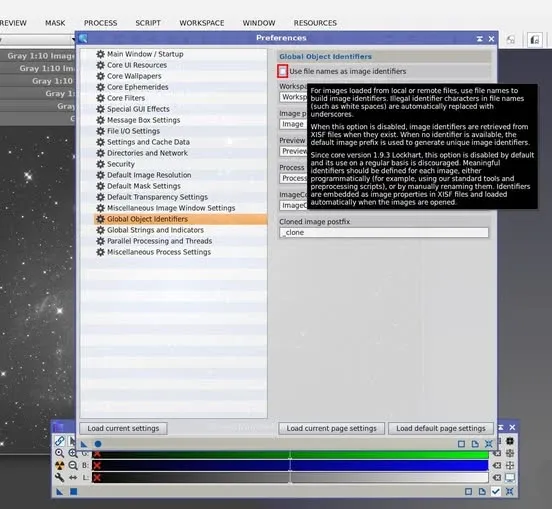
Fortunately, there’s an option in the settings that restores the original behavior, located here:
Edit > Global Preferences > Global Object Identifier
Just check “Use file names as image identifiers,” and the image will once again use its filename as its ID, returning to the familiar and handy way of working.