Blind Solver: A Blind Plate-Solving Script for PixInsight
Sometimes we have an image on hand and simply don’t know its shooting parameters, not the focal length, not the field of view, not even which region of the sky it captures. In this situation, the ordinary ImageSolver has a hard time solving, because it needs you to supply roughly correct shooting information first. Blind Solver, a PixInsight add-on script, was born to solve exactly this scenario.
How It Works
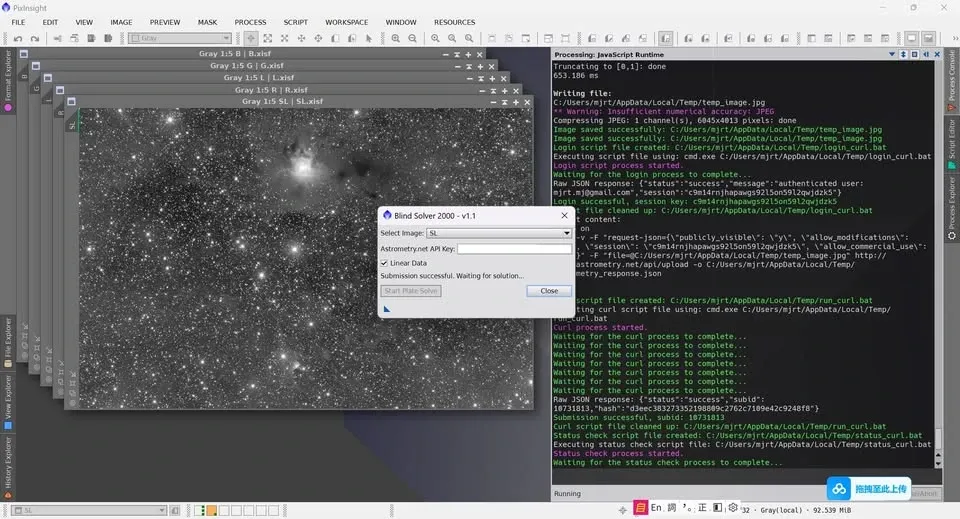
Blind Solver performs a “blind solve” through the astrometry.net website. To use it, you need to enter an API key (which you can only get after registering at astrometry.net first). Because it uploads to the website to solve, it’s relatively slow.
After the add-on finishes running, it automatically loads PixInsight’s ImageSolver script and auto-fills the relevant shooting parameters obtained by Blind Solver. Then you just manually press ImageSolver once more, and it will load plate-solving information that PixInsight can recognize onto the PixInsight image.
When to Use It
This add-on is best suited to images where you “completely don’t know the shooting parameters.”
Of course, you can also manually upload the image to astrometry.net yourself, obtain the parameters, and then fill them into PixInsight’s ImageSolver script by hand, the result is the same. What the Blind Solver script does is automate the two steps of “opening the website” and “manually filling in the parameters,” saving you that labor.