FBPP: A Fast Preprocessing Script for Beginners
WBPP is comprehensive, but for beginners, that big pile of baffling options is often the first hurdle to getting into PixInsight. The FBPP (Fast Batch Preprocessing) introduced in PixInsight 1.8.9-3 is a script that removes that hurdle almost entirely.
What Is FBPP
FBPP was released alongside PixInsight 1.8.9-3 and can be seen as WBPP slimmed down once more — slimmed down until there’s almost nothing left to choose.
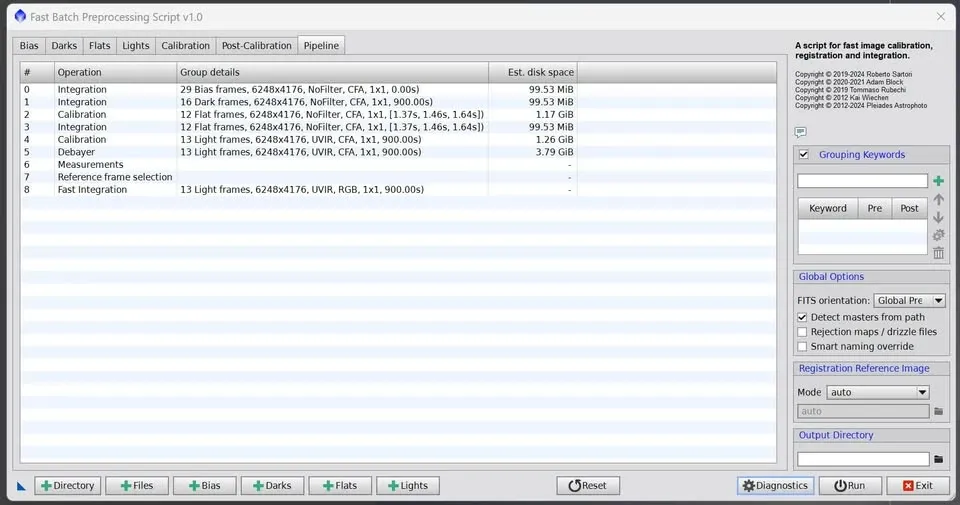
Using it goes roughly like this:
- Load your lights, darks, flats, and bias (bias is optional), and choose whether it’s a color camera (CFA); if the exposure times of the lights and darks don’t match, you can specify them yourself. And that’s where the setup ends — all those options in WBPP that beginners can’t make sense of are gone.
- The integration algorithms are all set automatically too. The whole process just does calibration, debayering (for color cameras), basic measurement, registration, and fast integration.
If you’re a beginner encountering PixInsight for the first time and just want to stack, or an enthusiast doing Lucky Imaging with hundreds or thousands of frames on hand, FBPP is quite suitable, and you’ll hardly ever pick the wrong settings. As for veterans, you can keep using WBPP for the most complete and comprehensive flexibility in settings.
Just How Different Are FBPP and WBPP?
I ran an experiment myself, comparing the speed of FBPP and WBPP. The test was integrating 65 APS-C-sized (IMX571), 24-megapixel images, with the master calibration frames prepared in advance.
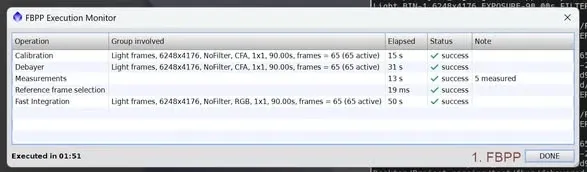
The results were as follows:
- If WBPP uses Fast Integration, the final speed is exactly the same as FBPP (1:51).
- If WBPP uses Image Integration, then FBPP takes only about a third of WBPP’s time (FBPP 1:51 vs. WBPP 5:21).
In other words, FBPP’s “speed” mainly comes from its taking the Fast Integration route by default; the moment WBPP also switches to Fast Integration, the speeds even out.
Who should use which?
- Beginners: FBPP is recommended — very fast, simple, and easy to use.
- Non-beginners: WBPP is recommended — fast or slow, or going all out for the best result, it does it all.
(Test platform: AMD R9-7950X, Teamgroup DDR5 48GB×2, Windows 11 Enterprise 23H2, PixInsight 1.8.9-3 build 1612.)