SCNR Green Removal and Star-Color Protection
SCNR is PixInsight’s go-to weapon for dealing with excess green, and it’s practically a must-use tool on SHO false-color (Hubble palette) images. But it can also accidentally damage star colors. This article organizes what SCNR is for, its side effects, and how to protect stars.
The Sickly-Green Problem in SHO Images
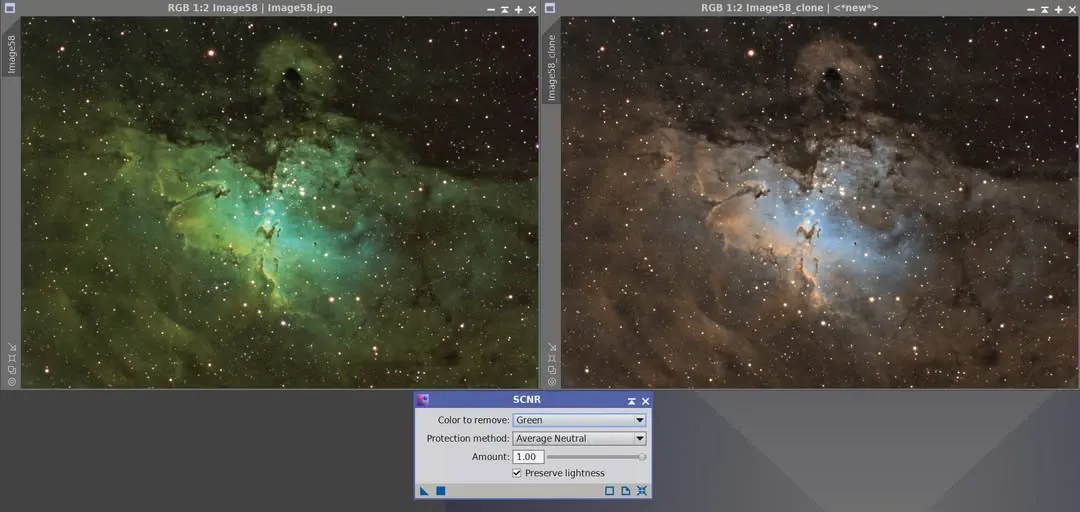
Some people, after finishing an SHO image, find the whole thing a sickly green, not at all like the so-called Hubble false color. This is because a strong Ha signal falls on the G channel, making green too strong.
At this point, if you use PixInsight’s SCNR, you can remove the sickly green almost “in one click,” bringing the image back to a normal Hubble false-color tone. For fellow hobbyists who have long been plagued by sickly green and spend a lot of time on tone conversion, this is a very direct solution.
Handling Magenta Stars
Beyond overall green removal, SCNR-related ideas are also often used to handle the magenta stars in the Hubble palette. This adjustment of magenta stars in an SHO false-color image can be demonstrated in both Photoshop and PixInsight (demo video: https://youtu.be/lt9w7X7y8jA).
But keep in mind that adjusting is only treating the symptom. The most natural approach is still to replace these incorrectly colored narrowband stars with short-exposure RGB stars, so that the star colors turn out real.
SCNR’s Side Effect: Damaged Yellow Stars
Having talked so much about SCNR’s benefits, here I want to talk about the damage it can cause.
While SCNR removes excess green, if a star happens to be yellow, sometimes after running SCNR you’ll find the star’s yellow has been removed, especially damaging the center of the yellow star. The stars in the sample image are large, so it’s easy to see; with small-star images, the center of a yellow star could end up directly missing.
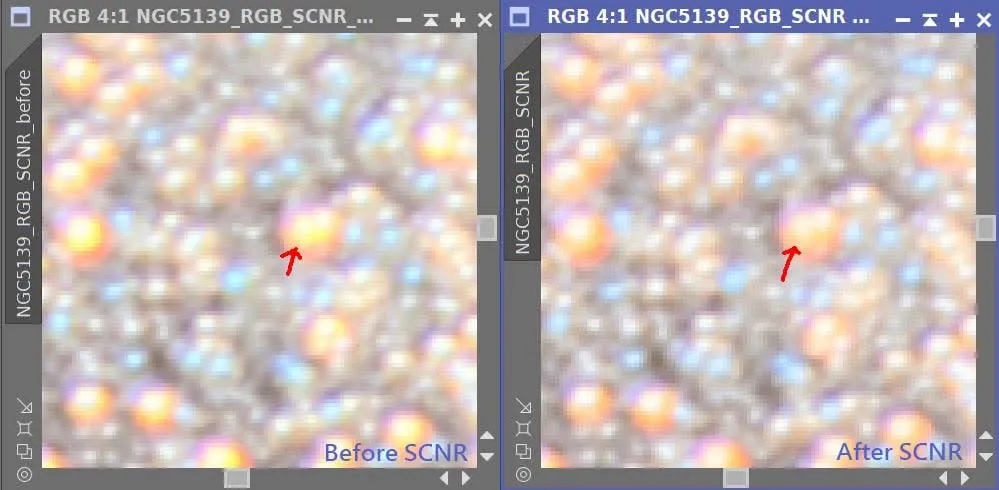
A few possible solutions:
- Use a mask to apply SCNR only where it’s really needed (for example, in lower-SNR areas), avoiding the stars.
- Use the RGB image to repair the damaged centers of the yellow stars.
In other words, SCNR is convenient, but don’t mindlessly apply it to the whole image; pairing it with a mask, or patching with RGB stars afterward, is how you keep both the green removal and the star colors intact.