Does Using AI Mean You No Longer Need Masks? Starting from the Star Artifacts NXT Causes
This article is compiled from notes taken in 2023; some tools or workflows may have since been updated, so please keep that in mind while reading.
Traditionally, there are quite a few processes that can damage stars — for example noise reduction, deconvolution, Wavelet, LHE, and so on. That’s why, in the past when using these processes, we often had to make a star mask first to prevent the stars from being damaged.
Since AI-related processes appeared, star damage has been reduced considerably. Star removal processes let us remove the stars first and enhance only the background. However, some processes can’t necessarily be completed on a starless image — for instance, traditional deconvolution often damages the core of stars whose PSF is incorrect. Of course, this problem seems to have been solved since BXT appeared.
So, now that we have AI, do we no longer need masks at all? A recent experience of mine gave a firm no.
The problem: NXT altered star centers for the worse in the linear state
When I noticed that a recently processed image had problems at the star centers in the nonlinear state, I backtracked through some steps and finally found the answer.
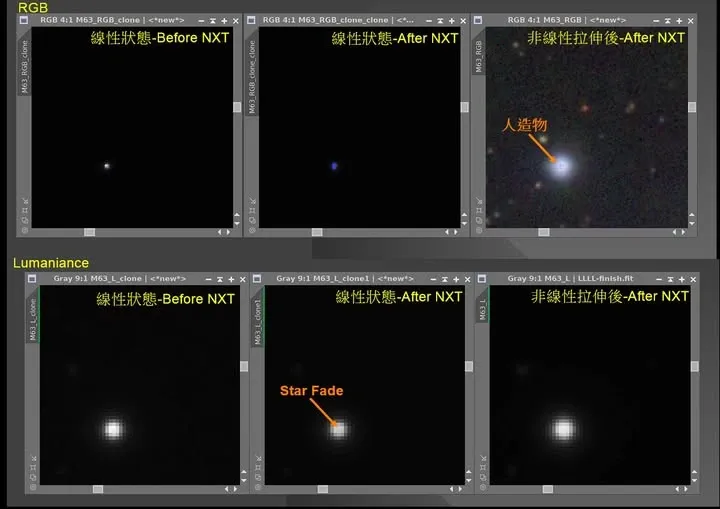
NoiseXTerminator (NXT), as a new-generation AI noise reduction tool, is all about automatically identifying noise without affecting the rest of the image. Thanks to its AI-model training, this process really does do a great job. However, I found that if this process is used in the linear state, it produces different problems at the centers of color stars and luminance stars respectively — and this problem isn’t obvious, usually only being noticed after the nonlinear stretch.
- Color stars: the core pixels of the brighter stars get modified (as in the top-middle of the figure). After the nonlinear stretch, this shows up as oddly colored artifacts.
- Luminance stars: usually the star’s core is the brightest, but after NXT the star center’s brightness drops, so the surroundings end up brighter than the center, producing a star fade problem at the core (as in the bottom row of the figure). This problem is less obvious than on RGB stars, but it’s visible on medium-brightness stars.
The solution: AI needs masks too
Before I’d found the cause, I always fixed the star cores at the end in Photoshop with the healing tool, and for luminance I’d slightly lift the highlights to make the star centers brighter.
Now that I’ve found the root cause, my approach is: when using NXT, pair it with at least a star mask (or a highlight-object mask), just like with traditional noise reduction.
I’ve already reported this problem to Russell Croman. Until it’s resolved, I’d recommend pairing a mask with NXT. I’d also suggest you go back and look at your own images where you’ve used NXT, and check whether anything similar has shown up.