Using an Enterprise-Grade U.2 SSD to Store Imaging Data: A WD SN650 7.68 TB Unboxing
Astrophotography imaging data is very storage-hungry—easily tens of gigabytes in a single night. After the 4 TB M.2 drive I had been using went in for RMA repair, I took the opportunity to look for a somewhat atypical solid-state drive to fill the gap—the WD SN650, U.2 interface, 7.68 TB.
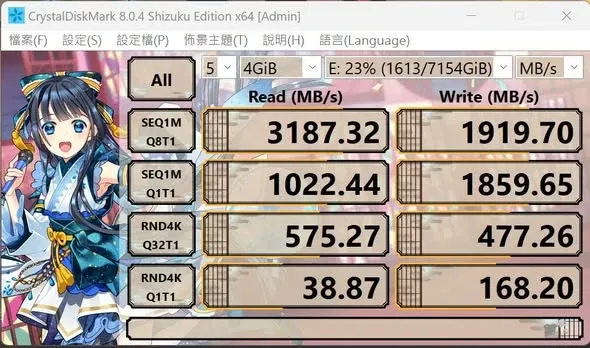
Not a SATA SSD—a Server-Grade U.2 Interface
At first glance, this drive looks a lot like an ordinary 2.5-inch SATA SSD, but it actually runs on the server-specific U.2 interface. Because of that, fitting it into an ordinary desktop computer requires a PCIe adapter card, or an M.2 adapter.
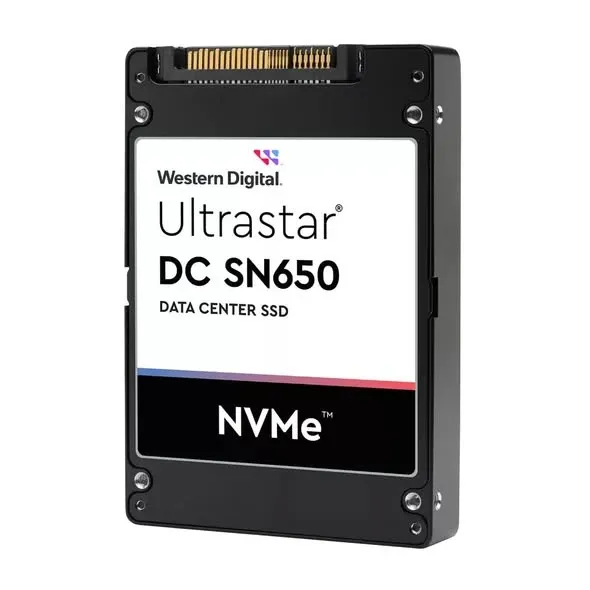
Once installed and booted, the computer recognizes the drive directly; then, after installing the driver, read/write performance can gain a further boost. In my testing, its performance lands at roughly the PCIe 3.0 level. Also, because it’s meant for server use, it’s extremely write-endurant—the officially rated five-year total bytes written (TBW) reaches as high as 11,212 TB, which offers real peace of mind for anyone who frequently moves large volumes of imaging files.
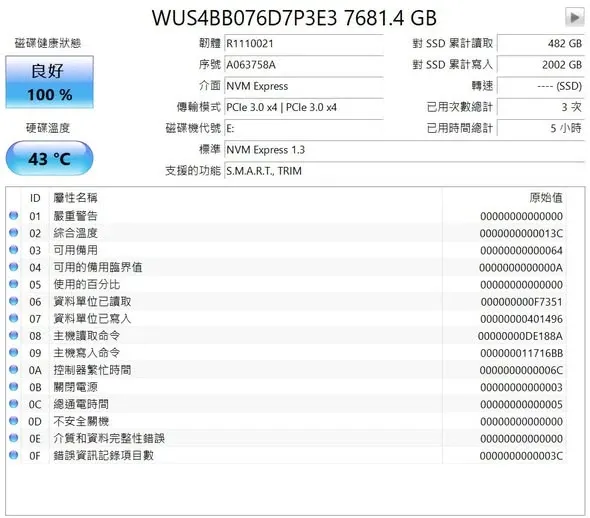
The Biggest Advantage: Cost per Capacity
What attracts me most about this drive is actually the price. It runs around NT$1,200 per TB, with a total usable capacity approaching 7 TB. If you go looking for an M.2 drive of the same capacity (say, 8 TB), the price is often two to three times this drive’s, or more. For anyone who needs to store large volumes of imaging data over the long term, this cost per capacity is quite competitive.

Usage Limitations
The main limitation is probably the installation requirement: it can only be installed in a slot with PCIe 4x, or adapted through an M.2 interface. As long as your motherboard has that kind of expansion capability, then using an enterprise-grade U.2 SSD as high-capacity storage for astrophotography is a very cost-effective choice. That’s my sharing for now.