How to Do Software Pixel Binning
Pixel binning (Binning, or Bin for short) is a technique commonly used in astrophotography. This article focuses on one practical issue: rather than having the camera do the binning at capture time, it’s better to save the image and then do it in software on the computer afterward—the result is usually better. Here I’ll show the simplest approach in each of PixInsight and Astro Pixel Processor.
First, a Heads-Up: Different Brands Have Different Bin Defaults
ZWO and QHY are two of the most common cooled camera brands in amateur astrophotography today. Interestingly, even when two cameras use the same CMOS chip, their operating characteristics can differ—one of which is the default behavior of Bin (pixel binning). It turns out ZWO’s and QHY’s Bin defaults are different.
Precisely because the camera-side behavior varies from brand to brand, I’m more inclined to leave binning to the post-processing stage, handling it uniformly in software on the computer. This way the result is not only controllable, but you also have more algorithm choices. (For the details of the ZWO vs. QHY Bin differences and the principles of bit depth, there’s a separate dedicated article.)
Approach One: Use IntegerResample in PixInsight
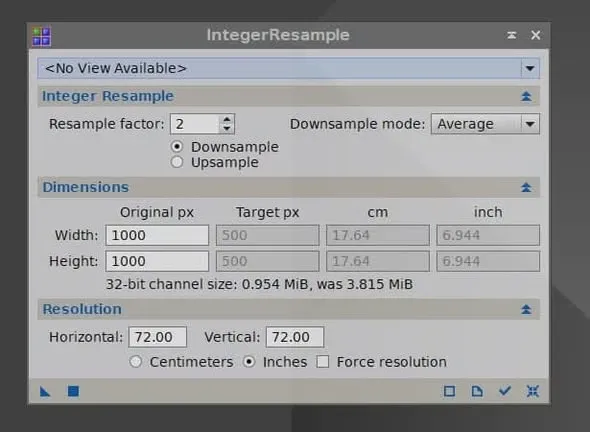
In PI, use the IntegerResample process:
- set factor to 2 and choose downsample;
- set mode to average.
The result you get this way will be exactly the same as the CMOS camera’s “average Bin” result. In other words, you can reproduce the camera’s average Bin effect on your computer, and do so using the complete data for the computation.
Approach Two: Use INTEGRATE scale in APP
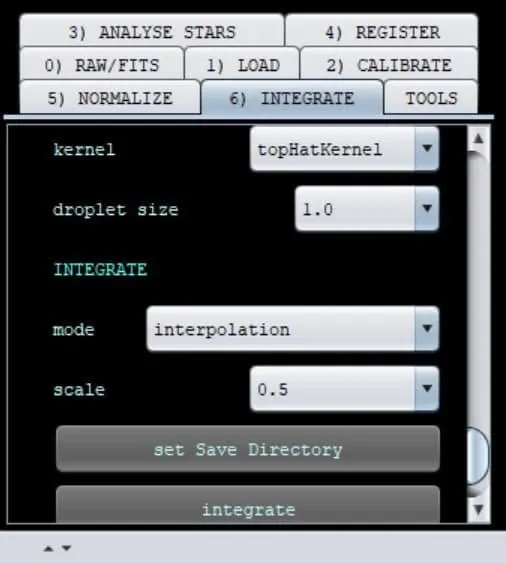
In Astro Pixel Processor, the approach is to go to the “6) INTEGRATE” tab and set INTEGRATE scale to 0.5.
Note that this result should be more similar to the result of PI’s resample process using interpolation, rather than being exactly equivalent to the averaging approach of IntegerResample above. The difference between the two lies in the algorithm used during resampling, and in actual use you can choose according to your needs.
Wrap-Up
Pixel binning itself isn’t difficult; the key is “where you do it.” Binning on the camera side is mainly for shrinking file size or raising the frame rate; but if the goal is to improve the signal-to-noise ratio and preserve the complete data, then saving the image and doing it in software in PixInsight or APP afterward is the more reliable choice.