How Blend Modes Work, and Layer-Style Operations in PixInsight
Pixel blending is one of the core techniques of astro image processing. Whether you use Photoshop or PixInsight, understanding how blend modes work is often more important than memorizing a pile of operation steps. This article organizes my notes on blend modes, and how to achieve similar effects in PixInsight with a layer-oriented mindset.
Photoshop’s Strength Is Blending
The thing Photoshop is best at is blending all the way through, combined with countless layer masks for fine control. The blend modes most commonly used in astro image processing are:
- Darken
- Multiply
- Screen
- Overlay
- Soft Light
- Luminosity
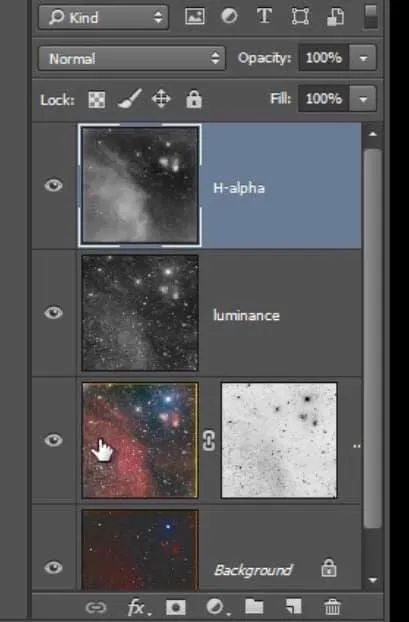
The Math Behind Blend Modes
To really use blend modes well, it helps to understand the math formula behind each one. Every blend mode actually corresponds to a pixel-arithmetic formula. Once you know the formula, you can anticipate what will happen when two images are stacked together, instead of just fumbling around by feel.
RBA, the author of the deepskycolors website, long ago compiled all the blend modes and their corresponding formulas into a single table. It’s very practical, and I recommend that anyone who wants to understand this in depth track it down for reference.
Layer-Style Operations in PixInsight
PixInsight doesn’t have a layers panel like Photoshop’s, but it can actually treat each independent image as a “layer.” To achieve Photoshop-style layer blending, there are two main routes:
- PixelMath: it can do exactly the same thing as blend modes, except you have to write the formula yourself.
- The Blend script: its menu of modes is almost the same as Photoshop’s, plus it adds some modes designed specifically for astro images, and it can also automatically apply a screen stretch.
Frankly, PixInsight’s layer blending, in terms of operational flexibility, is probably less than a tenth of Photoshop’s. But the good news is that the community has scripts that offer real-time preview. For example, Cosmic Photons’ imageblend script provides the ability to preview blend results in real time.
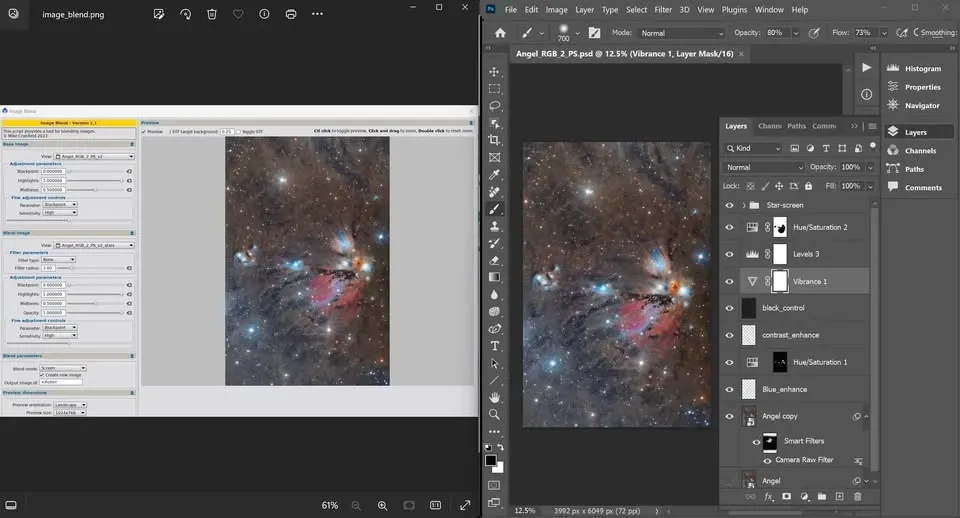
If you’re familiar with Photoshop’s layer blending, you’ll find the imageblend script easy to pick up. Its biggest limitation is that you can’t freely adjust how many images are blended; you’re completely limited by the options the script provides (for example, this script only processes two images at a time). Still, for PixInsight users, having a real-time preview is already a very convenient step. The download link for the script is available on the original author’s website; add it to PixInsight’s update repository manually, then choose update to install it.
For a full compilation of the blend-mode math formulas, see Deep Sky Colors’ “Formulas for Photoshop blending modes”: https://www.deepskycolors.com/archivo/2010/04/21/formulas-for-Photoshop-blending-modes.html