The Difference Between ChannelCombination and LRGBCombination
The two PixInsight processes ChannelCombination and LRGBCombination have very similar names, which often leaves people unsure which to use when, and quite a few tutorial videos online mix them up as well. This article shares how I use them myself, along with the actual computational difference between the two.
How I Use Them
- LRGBCombination: I use it in the nonlinear state to replace the luminance of an RGB image with a separately processed L, that is, what’s called “adding an L channel into an RGB image.”
- ChannelCombination: my most common use is combining the three RGB channels in the linear state. Because ChannelCombination doesn’t perform any other processing on its own, it purely combines channels (the counterpart to ChannelExtraction’s channel separation).
ChannelCombination’s combination modes include RGB, HSV, HSI, CIEXYZ, CIEL*a*b, and CIEL*c*h. You can think of it as “a PixelMath with a point-and-click interface,” so in principle PixelMath can perform exactly the same operation.
Q&A One: What Happens If You Use LRGBCombination to Combine RGB in the Linear State?
A fellow imager asked about this. The figure below shows the result; for an objective comparison, both images in the figure have the same STF screen stretch applied.
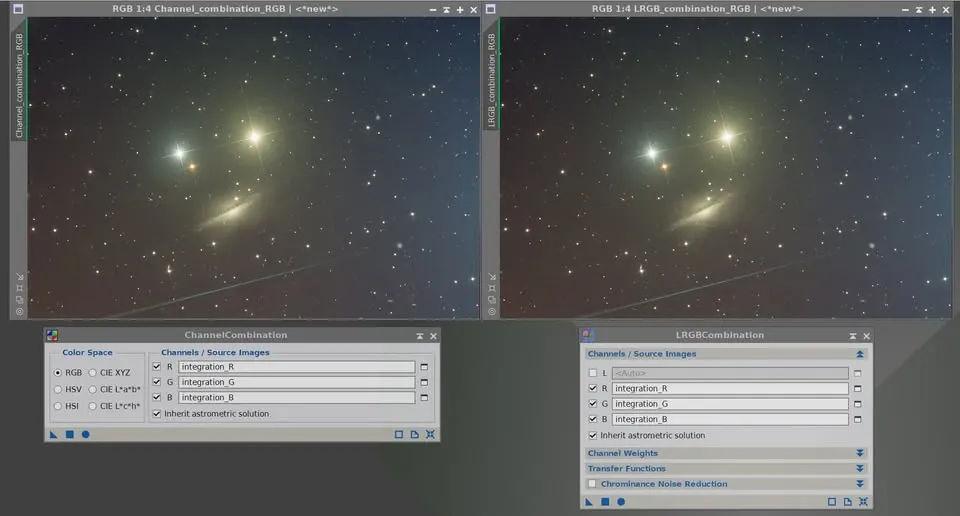
As you can see, LRGBCombination’s result (right) shows no difference compared to ChannelCombination’s (left). To avoid being fooled by the eye, I even magnified the images to the pixel level and measured the values, and they were completely identical.
But note that this only holds on the premise that LRGBCombination’s transfer settings are “left entirely at their defaults.” This process offers options to modify channel weights, the transfer function, and chrominance noise reduction; once you change these options, the result will differ from ChannelCombination.
Q&A Two: Why Do Colors Go Wrong When Combining with LRGBCombination in the Linear State?
Another imager asked why, in the linear state, colors go wrong when using LRGBCombination to combine L, R, G, B separately, or to combine L with RGB.
The answer is consistent with an article I shared earlier: because LRGBCombination is a nonlinear process and needs to run in the nonlinear state. Although you won’t hit trouble when simply combining RGB channels (and keeping the defaults), the moment L is involved, or you adjust the parameters in the interface, problems can arise.