Shooting a Total Lunar Eclipse With a Mono Camera: Manual RGB Alignment and Integration
The hardest part of shooting a total lunar eclipse with a mono camera is having to align the RGB channels manually—especially if you also plan to integrate. During an eclipse the Moon’s brightness and color change quickly, and with the three filters shot at different times, alignment is far more troublesome than for an ordinary deep-sky target. This article takes the processing of the “blue band” from the May 2022 total lunar eclipse in Chile as an example to talk about this.
The Blue Band: A Short Stretch of Blue Between Penumbra and Umbra
First, why this shoot was special. For the total lunar eclipse in Chile on 16 May 2022, I picked a set of RGB frames from around the onset of totality to process. At the moment of capture, the Moon happened to lie right between Earth’s penumbra and umbra, which gave the lunar surface a short stretch of blue—the so-called “blue band.”
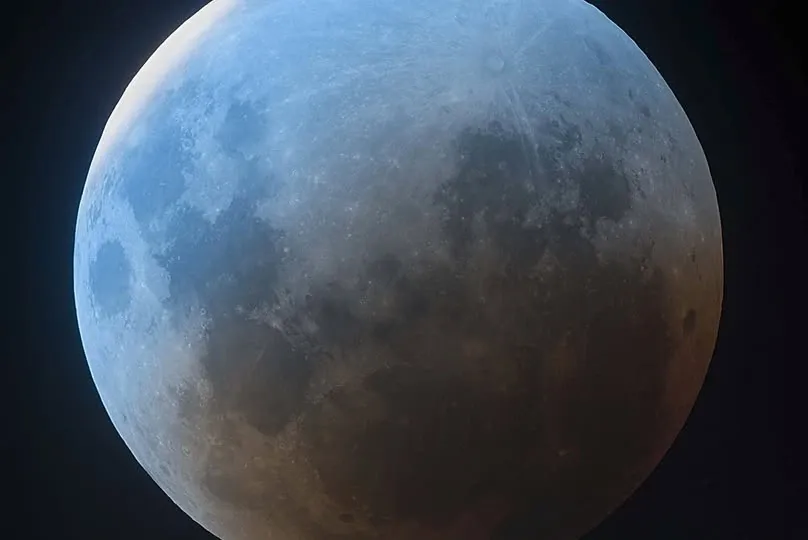
For the first pass I chose this set (R 0.5s at 3:28, G 3.5s at 3:33, B 10s at 3:37). Later I felt the result seemed a bit off (and a fellow imager kindly pointed it out too), so I switched to another set of RGB frames from just as totality was ending and redid it—R 4s, G 4s, B 15s (4:37–4:38 UTC).
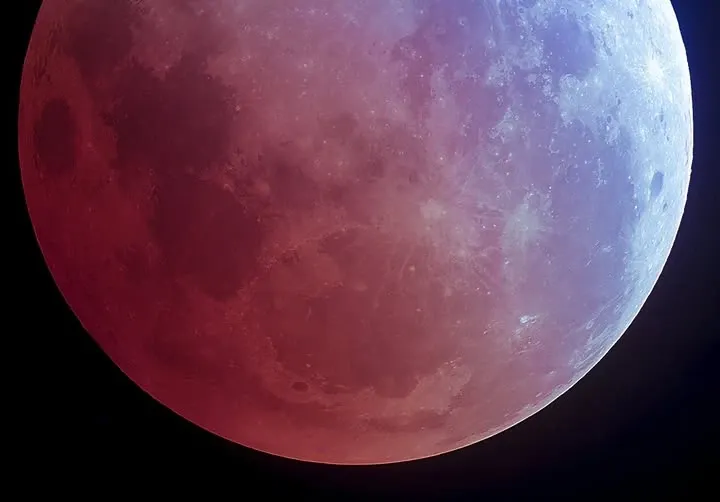
This is a good place to point out a reality of shooting a lunar eclipse in mono: the exposure times of the channels differ (blue light is weaker, so the B channel often has to be exposed longer), and the capture times differ too, all of which carries over into the alignment and combination later on. The gear was a Planewave CDK 17″, an SBIG STXL 11002 (with AOX), and a Paramount ME, processed with PixInsight, Photoshop, and RegiStax6. (For the astronomical background of the blue band, you can consult separate explanatory material on the phenomenon.)
Manual Alignment, Integration, and Star Trailing
So what about integration? On another lunar-eclipse shoot, I integrated 10 frames for each of the three channels, and the result was reasonably successful.
But shooting RGB in mono at different times and then integrating runs into one typical phenomenon: the stars trail. Because the Moon is moving relative to the background stars, when you align and integrate using the lunar surface as the reference, the background stars get stretched into streaks; and since the three channels were shot at different times, what you get are tricolor streaks. On that occasion, because Uranus was too far away, I didn’t bother dealing with those trailed stars and simply left a tricolor streak in the lower-right corner of the frame.
This actually highlights the core trade-off in integrating a mono-shot lunar eclipse: align the lunar surface and you can’t align the background stars—you can only pick one as the reference. To preserve lunar-surface detail, you usually just have to accept the star trailing, or deal with it separately afterward. Only once you’ve built up the fundamentals of manual RGB alignment can targets like this be processed reliably.