Processing the Galaxy Core: Compressing Dynamic Range with HDRMT
The most common headache when shooting galaxies is that the core is too bright. In the vast majority of galaxies the central brightness is far greater than the surroundings, and even though modern sensors can capture both at once (without overexposing), presenting such a huge dynamic range on a single screen leaves quite a few people stumped. Taking M31 as the example, this article explains how to use PixInsight’s HDRMultiscaleTransform (HDRMT) to compress dynamic range.
The problem: the core is too bright and eats the detail
In most galaxy images online, the center is so bright it “eats up” all the nearby detail with light — the core is a dead white patch, and you can’t see the surrounding dust structure. This isn’t a matter of poor shooting; it’s that the dynamic range is too large and hasn’t been properly compressed.
What HDRMT does
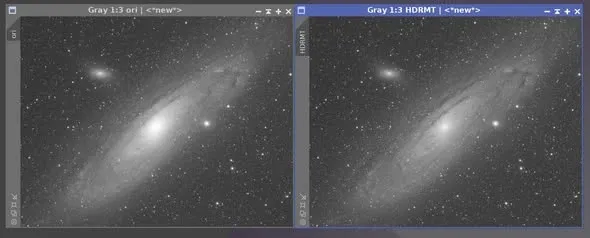
Below is a comparison of using PixInsight’s HDRMT to compress dynamic range. The left is the original M31 luminance channel — the way most online images look: an overly bright center with detail drowned out by the highlights. The right is M31 after HDRMT compression — you can see the bright core is no longer so glaring, so the dust detail and stars near the core all become clearer.
The advantages of HDRMT
HDRMT has one very important advantage: although it compresses the highlights, it doesn’t make the parts that should be dark any darker than they originally were. In other words, the galaxy core is “still the brightest” relative to its surroundings — just no longer glaring — so you can see the detail clearly while the image’s light-and-dark logic isn’t broken. This is what makes the result look natural, without the jarring feeling of “over-compression.”
The drawback, and pairing it with masks
Of course HDRMT comes at a cost: it may affect the stars and other parts of the image. So it’s a very common technique to pair it appropriately with a star mask or a range mask to limit the area it acts on.
In this M31 example I didn’t use a mask — because M31 has relatively few bright foreground stars, the side effects of applying it directly aren’t obvious. But if your target has quite a few bright stars around it, I’d recommend adding a mask for protection to keep the stars from getting caught up in it.
Wrap-up
After processing the core, M31 looks a good deal less like the beginner work you commonly see online. Compressing the galaxy core is a key step in advanced processing — remember HDRMT’s trait of “compressing the highlights but not over-compressing,” pair it with a mask as the situation calls for, and you can preserve both the core detail and the overall tonal range at the same time.