Why My LRGB Has No Color: The Correct Way to Use LRGBCombination
I’m sure many people who’ve switched from a color camera (a DSLR or a cooled CMOS) to a mono camera and shoot with LRGB filters run into problems combining L with RGB at first. And the place this most often goes wrong is color — the color won’t come through, or it’s dull and lifeless.
There are many causes for this. In this article I’ll limit the scope to the case of “using LRGBCombination in PixInsight”: that is, taking the same L and RGB and combining them with LRGBCombination in different states, yet getting different results — and using that to explain the best way to use the LRGBCombination process.
The Conclusion First
LRGBCombination is a nonlinear-state process, and is only suitable for use in the nonlinear state.
If you’re not clear on what the linear and nonlinear states are, brush up on the relevant basics first, then come back to the experiment below.
Experimental Design
To control the variables, LRGBCombination’s parameters were kept exactly the same throughout this experiment; the L and RGB images were the identical files in the linear state, and no saturation-related parameters were adjusted in the nonlinear state.
As for the setup, I used an EIZO CS2731 monitor, viewed at a brightness of 105 cd/m², recently calibrated with an i1 Display Pro colorimeter, and the entire experiment was done in a color-managed PixInsight.
The image below contains four images, numbered as follows:
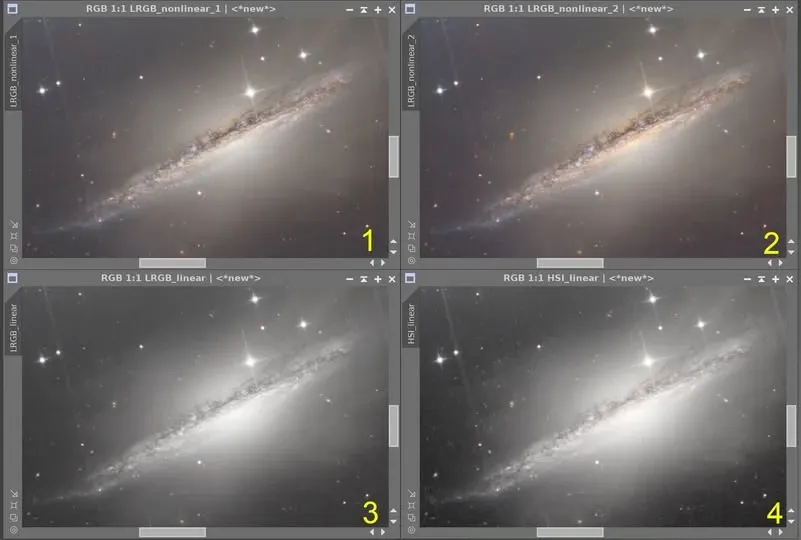
- Image 1: Both L and RGB are stretched with STF+HT, then combined with LRGBCombination after stretching (in the nonlinear state).
- Image 2: L is stretched with STF+HT, while RGB is stretched with a combination of methods (arcsinh, masked, GHS, HT), then combined with LRGBCombination after stretching (in the nonlinear state).
- Image 3: L and RGB are combined directly with LRGBCombination in the linear state, then stretched to nonlinear with STF+HT.
- Image 4: Using ChannelCombination’s HSI mode, the I of RGB is replaced with the unstretched L in the linear state, then stretched to nonlinear with STF+HT.
(A note on the abbreviations: STF = Screen Transfer Function, HT = Histogram Transformation.)
Experimental Results
- Most vivid color (Image 2): L and RGB stretched with different processes, then combined.
- Next best color (Image 1): L and RGB stretched with only STF+HT, then combined.
- Very faint color (Image 3): after combining L and RGB with LRGBCombination in the linear state and then stretching, color is barely discernible, only around the core.
- Color almost gone (Image 4): after replacing I with the unstretched L in the linear state and then stretching, there’s still no color even in the darker areas — it looks like a monochrome image.
Explanation
Although many factors affect the color of an LRGB image, the single step of “how L and RGB are combined” is enough on its own to leave the RGB color you worked so hard to capture almost invisible. So let me repeat the conclusion once more: LRGBCombination is a nonlinear process, only suitable for use in the nonlinear state — especially when you’re adding in the L.
Take my NGC 1055 image as an example: I chose the Image 2 method from the start. In fact, for nearly all my images (as long as they’re shot LRGB with a mono camera), I combine using the Image 2 approach to achieve the best color rendition. And with a color camera, as long as you’ve separated the L and RGB channels, it’s likewise only after reaching the nonlinear stage that you add the L back in. From there you continue with nonlinear processing to make the color fuller and more saturated, then refine it with masks.
Conversely, if you end up in the Image 3 or Image 4 situation, then even if you crank up the saturation hard in the nonlinear state, you might still manage to pull out the target color — but it’ll come with a lot of color noise, and the kind that’s hard to deal with or takes a great deal of time to fix. Here, even NXT can’t help much.
Wishing everyone smoother image processing and clear skies when you shoot.