Image Weighting for Integration: Comparing NSG, PSF Signal Weight, and APP
Before integration, the software assigns each sub-frame a different weight based on its quality: good images get a high weight and contribute more pixels during integration; poor images get a low weight and contribute less. Whether this “weight assessment” is accurate directly affects the quality of the final integrated image. This article compares the performance of several common weighting tools.
What’s Being Compared
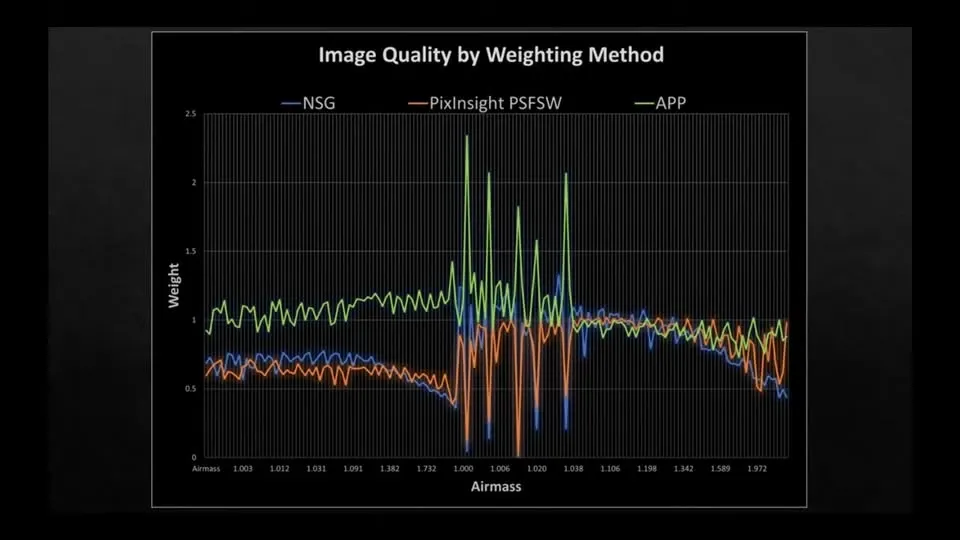
The figure below compares three scoring methods, applied to data from a small setup that is undersampled and partly affected by clouds, in terms of the image weights each assigns before integration:
- NSG: Normalize Scale Gradient Script
- PI PSF SW: PSF Signal Weight in PixInsight’s ImageIntegration process
- APP: Astro Pixel Processor
(Source of the image above: https://www.youtube.com/watch?v=KUtkg14dj6A)
Results
The image weights assigned by NSG and by the default PSF SW of the latest PI are quite close, and for cloud-affected images both assign a fairly low weight—which is the correct behavior we expect.
But when APP assigns weights, it exhibits a problem similar to PI’s earlier SNR scoring: for cloud-affected images, it instead assigns a fairly high weight. This will obviously over-adopt poor-quality images and drag down the final result.
Practical Advice
Therefore, if you are currently going to use APP for integration, you will inevitably have to manually delete those “partly cloudy” or “partly light-pollution-affected” images beforehand, so as to avoid their being wrongly assigned a high weight.
And if you are using NSG or PI’s PSF SW to assess weights, you do not need to go out of your way to do this—these tools can already correctly identify problem images and lower their weights.