Only Two Frames: How to Integrate with PixelMath
Every so often during integration you run into an awkward situation: you’ve only got two frames on hand. And PixInsight’s ImageIntegration has a threshold, it refuses to run on fewer than three frames. So with only two, is there really no way to integrate? There is, actually. We can bypass ImageIntegration and roll up our sleeves with PixelMath instead.
Put plainly, “integration” is mathematically just a weighted average of multiple aligned frames, used to improve the signal-to-noise ratio. ImageIntegration is powerful because, on top of averaging, it also does normalization and pixel rejection for you; but rejection needs at least three frames to work (you need a majority vote to judge which pixel is an outlier). So when only two are left, we settle for the next best thing and use PixelMath to manually accomplish the most essential part, the “align then average.”
The Simplest Approach: Add, Then Average
To combine two frames is, in essence, to add them and divide by two. The formula you enter in PixelMath is to add the two frames and multiply by 0.5 (i.e. ÷2).
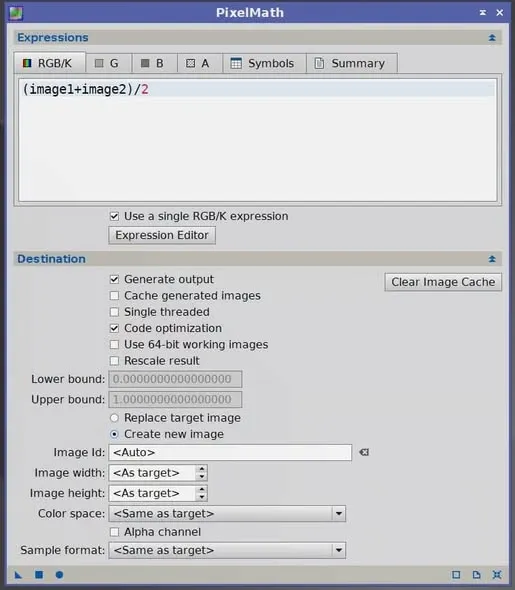
This gives you the averaged result of the two.
Want Different Weights? Split the Coefficients
If you don’t just want a plain average but want each of the two frames to carry a different weight, then expand the formula and adjust the coefficient in front of each frame separately.
For example:
0.8*image1 + 0.2*image2This makes the two frames’ weights 4:1. How you set the coefficients depends on your judgment of the two frames’ quality; the only rule is that the two coefficients add up to 1.
A very important reminder: before you start, remember to align the two frames first. Adding them without alignment will double up the stars into ghost images, and all your effort is wasted. This step can’t be skipped no matter which formula you use. PixelMath only does per-pixel arithmetic; it won’t correct the displacement between the two frames for you.
Going Further: Normalize First, Then Average
The approach above is fine in a pinch, but if the two frames differ in background brightness or signal strength, adding and averaging them directly won’t give an ideal result. A more refined workflow is to normalize the two frames first, then average, in two steps:
- First, normalize, scaling the frame to be integrated to the reference frame’s scale:
($T-median($T))*MAD(ReferenceImage)/MAD($T)+median(ReferenceImage)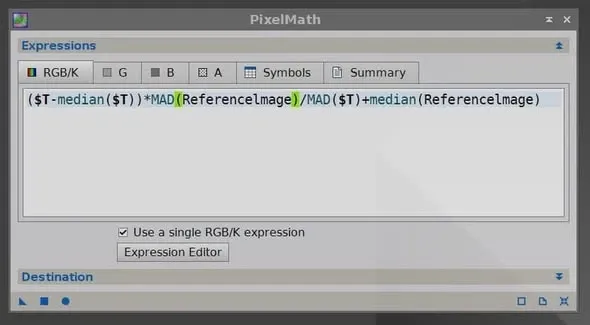
- Then average the two frames to complete the integration:
($T+ReferenceImage)/2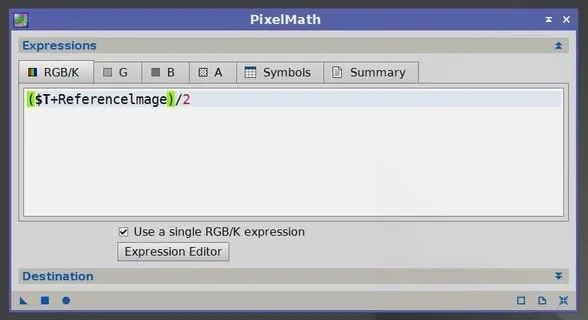
Two symbols in the formula need explaining:
- ReferenceImage stands for the better of the two frames, used as the normalization reference.
- $T is the other frame.
The benefit of normalizing first is that it puts the two frames on the same baseline before adding, avoiding contamination of the final result by one frame’s background or signal difference. Two frames may be few, but as long as the method is right, you can still integrate a clean final image.